How to do a jQuery autocomplete input element from an array source.
autocomplete gives the ability to find and select from a compiled list of values, helping aid searching.
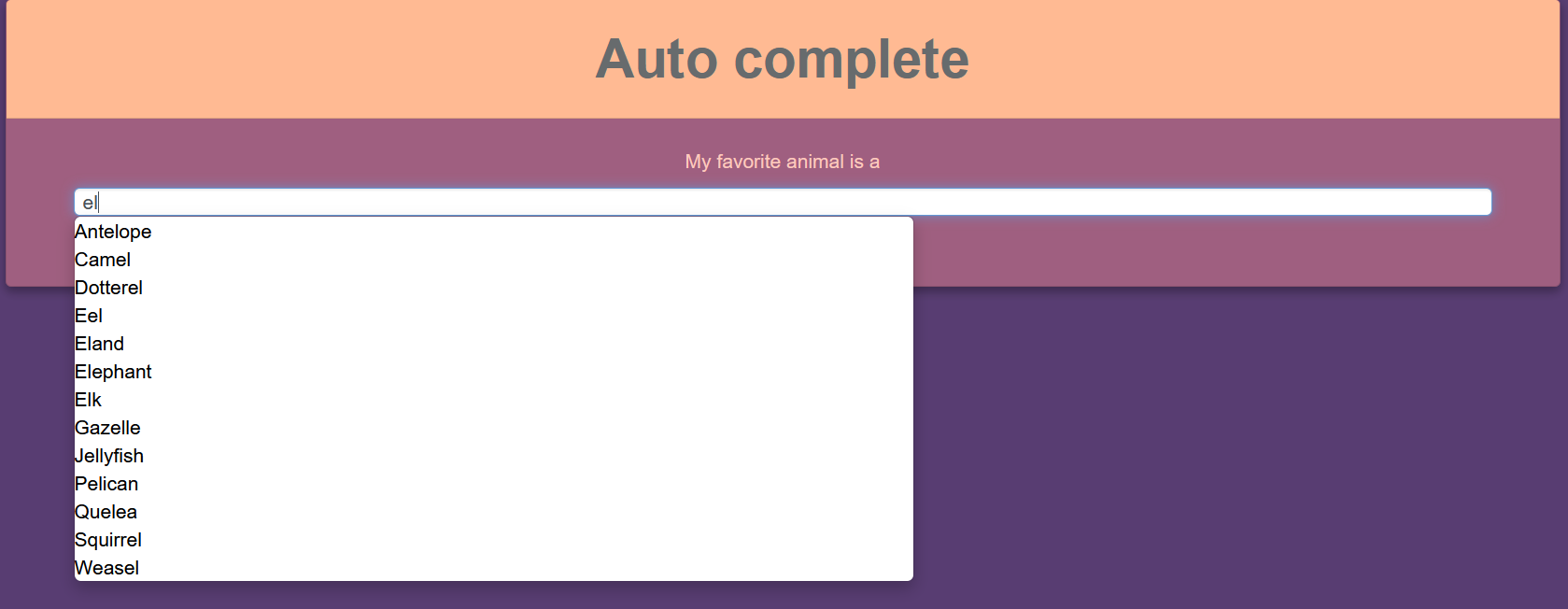
$(function () {
  var availableAnimals=["Aardvark","Albatross","Alligator","Alpaca","Ant","Anteater","Antelope","Ape","Armadillo","Donkey","Baboon","Badger","Barracuda","Bat","Bear","Beaver","Bee","Bison","Boar","Buffalo","Butterfly","Camel","Capybara","Caribou","Cassowary","Cat","Caterpillar","Cattle","Chamois","Cheetah","Chicken","Chimpanzee","Chinchilla","Chough","Clam","Cobra","Cockroach","Cod","Cormorant","Coyote","Crab","Crane","Crocodile","Crow","Curlew","Deer","Dinosaur","Dog","Dogfish","Dolphin","Dotterel","Dove","Dragonfly","Duck","Dugong","Dunlin","Eagle","Echidna","Eel","Eland","Elephant","Elk","Emu","Falcon","Ferret","Finch","Fish","Flamingo","Fly","Fox","Frog","Gaur","Gazelle","Gerbil","Giraffe","Gnat","Gnu","Goat","Goldfinch","Goldfish","Goose","Gorilla","Goshawk","Grasshopper","Grouse","Guanaco","Gull","Hamster","Hare","Hawk","Hedgehog","Heron","Herring","Hippopotamus","Hornet","Horse","Human","Hummingbird","Hyena","Ibex","Ibis","Jackal","Jaguar","Jay","Jellyfish","Kangaroo","Kingfisher","Koala","Kookabura","Kouprey","Kudu","Lapwing","Lark","Lemur","Leopard","Lion","Llama","Lobster","Locust","Loris","Louse","Lyrebird","Magpie","Mallard","Manatee","Mandrill","Mantis","Marten","Meerkat","Mink","Mole","Mongoose","Monkey","Moose","Mosquito","Mouse","Mule","Narwhal","Newt","Nightingale","Octopus","Okapi","Opossum","Oryx","Ostrich","Otter","Owl","Oyster","Panther","Parrot","Partridge","Peafowl","Pelican","Penguin","Pheasant","Pig","Pigeon","Pony","Porcupine","Porpoise","Quail","Quelea","Quetzal","Rabbit","Raccoon","Rail","Ram","Rat","Raven","Red deer","Red panda","Reindeer","Rhinoceros","Rook","Salamander","Salmon","Sand Dollar","Sandpiper","Sardine","Scorpion","Seahorse","Seal","Shark","Sheep","Shrew","Skunk","Snail","Snake","Sparrow","Spider","Spoonbill","Squid","Squirrel","Starling","Stingray","Stinkbug","Stork","Swallow","Swan","Tapir","Tarsier","Termite","Tiger","Toad","Trout","Turkey","Turtle","Viper","Vulture","Wallaby","Walrus","Wasp","Weasel","Whale","Wildcat","Wolf","Wolverine","Wombat","Woodcock","Woodpecker","Worm","Wren","Yak","Zebra"];
  //https://gist.github.com/borlaym/585e2e09dd6abd9b0d0a
  $("#animals").autocomplete({
    source: availableAnimals,
    messages: {
      noResults: "",
      results: function () {}
    },
    select: function (event, ui) {
      $(".ui-helper-hidden-accessible").children("div").remove();
    }
  });
});
The HTML:
<div class="container">
  <div class="card text-center">
    <div class="card-header">
      <h1>Auto complete</h1>
    </div>
    <div class="card-body px-5">
      <div class="ui-widget">
        <form>
          <label for="animals" class="the-label">My favorite animal is a </label>
          <input id="animals" type="text" class="form-control">
        </form>
      </div>
    </div>
  </div>
</div>
<head>
<title>jQuery autocomplete</title>
<link rel="stylesheet" href="https://write.corbpie.com/wp-content/litespeed/localres/aHR0cHM6Ly9jZG5qcy5jbG91ZGZsYXJlLmNvbS8=ajax/libs/twitter-bootstrap/4.5.3/css/bootstrap.min.css"/>
<script src="https://write.corbpie.com/wp-content/litespeed/localres/aHR0cHM6Ly9jZG5qcy5jbG91ZGZsYXJlLmNvbS8=ajax/libs/jquery/3.5.1/jquery.min.js"></script>
<script src="https://write.corbpie.com/wp-content/litespeed/localres/aHR0cHM6Ly9jZG5qcy5jbG91ZGZsYXJlLmNvbS8=ajax/libs/jquery.devbridge-autocomplete/1.4.11/jquery.autocomplete.min.js"></script>
</head>CSS:
body {
  background-color: #583d72;
  color: black;
}
.the-label {
  color: #fecabd;
  margin-bottom: 0.6rem;
}
h1 {
  color: #676b6d;
}
.card {
  background-color: #9f5f80;
  box-shadow: 0 3px 6px rgba(0, 0, 0, 0.15), 0 3px 6px rgba(0, 0, 0, 0.2);
}
.card-header {
  background-color: #ffba93;
}
ul {
  list-style-type: none;
}
.ui-autocomplete {
  min-width: 160px;
  max-width: 600px;
  position: absolute;
  list-style: none;
  background-color: #ffffff;
  border-color: #ccc;
  border-color: rgba(0, 0, 0, 0.2);
  border-style: solid;
  border-width: 1px;
  -webkit-border-radius: 5px;
  -moz-border-radius: 5px;
  border-radius: 5px;
  -webkit-box-shadow: 0 5px 10px rgba(0, 0, 0, 0.2);
  -moz-box-shadow: 0 5px 10px rgba(0, 0, 0, 0.2);
  box-shadow: 0 5px 10px rgba(0, 0, 0, 0.2);
  -webkit-background-clip: padding-box;
  -moz-background-clip: padding;
  background-clip: padding-box;
  *border-right-width: 2px;
  *border-bottom-width: 2px;
}

.ui-menu-item:hover {
  background-color: #dadce8;
}

.ui-helper-hidden-accessible {
  display: none;
}